8ma is a lightweight tool for selling digital downloads with your personal WeChat Pay or Alipay account. Set up either payment method, add your product and set a price, then share the purchase link. 8ma hosts the checkout page, so there’s no website to build.
You can upload files, add a cloud link, import license keys, or sell plain-text templates.
See the three setup steps · Already set up payments? Add and price your product · Copy a short blurb · Check your first order
Personal WeChat Pay uses the Windows payment assistant. Personal Alipay uses a QR code you scan with your own Alipay account. Either option is enough to start. You can keep the same purchase link if you add the other later. Compare the setup steps before signing up. Copy the payment setup note.
Register to list a file (Chinese interface) · Sign in to the dashboard · 中文三步上架指南 · 中文新手上架指南
On the Chinese registration page, enter your mobile number in 账号或手机号码 (Account or mobile number). Select 获取短信验证码 (Get SMS code), enter the code in 短信验证码 (SMS code), then select 注册 (Register). 邀请码(选填) is an optional invitation code. If you already have an account, choose 登录 (Sign in). Open registration · Sign in
After signing in, open 收款通道 (Payment Channels) and set up personal WeChat Pay or Alipay. Either one is enough to publish your first product. Compare the WeChat Pay and Alipay setup steps.
Choose an example: PDF workbook · Original audio · Recorded lesson
Choose what buyers receive: Upload a file · Deliver a cloud folder · Deliver a unique license key. The linked examples are in Chinese.
Choose the delivery type in your listing. For a PDF or ZIP, upload the full file. For a cloud folder, enter the share URL and access code. For unique license keys, import one key per line. For original copy or message templates, show a short sample publicly and paste the full text into the delivery field. Copy the English purchase message. See a plain-text listing example (Chinese). Set a price and share the checkout link. Buyers return to that link after payment is confirmed.
Three setup steps
New to 8ma? See English help with registration before opening the Chinese form.
Watch the 16-second setup overview · 中文短片 · Share this three-step overview
Set up personal WeChat Pay or Alipay → Add a product and set a price → Share the purchase link. Buyers use the same link to pay and collect their purchase once payment is confirmed.
Create an 8ma account (Chinese interface) · English help for the signup form · See delivery examples
You only need one method to start. Personal WeChat Pay uses a helper that runs on Windows. For personal Alipay, scan the activation QR code with your own Alipay account. Compare the setup steps. Already set up personal WeChat Pay or Alipay? Skip to adding your product.
- Enable a payment method. In the dashboard, open Payment Channels (收款通道) and set up your own WeChat Pay or Alipay account. Use the Windows assistant for WeChat Pay, or start with Alipay if you don’t have a Windows computer. See what each option requires.
- Add your product and set a price. Open Publish Resource (发布资源). Upload a file if buyers get a PDF or ZIP. If the material stays in cloud storage, enter its share link and access code, if required. If each buyer gets a unique license key, import your keys with one complete key per inventory entry. The linked examples are in Chinese. Set a price and tell buyers what they will receive. See the official publishing steps (in Chinese). Product already listed? Skip to copying and checking the purchase link. Once your first payment is confirmed, verify your first delivery.
- Copy the purchase link and share it. After publishing, open the Resource List (资源清单), find your product, and copy its public purchase link. Buyers use that same link to pay with the displayed WeChat Pay or Alipay option and collect their purchase after payment is confirmed. Check what buyers see before sharing, then paste the link next to your sample or share it in a group chat. Copy sample buyer wording. Browse Chinese buyer templates by product. See the purchase wording next to a PDF sample (in Chinese). For an in-person workshop, turn the same link into a QR code for the sign-in table. See the printable workshop sign (in Chinese). On an existing website, you can use the same link for a Buy button. See the WordPress button example (in Chinese). Before you share it, open the link in a private browser tab on your phone. Check the product name, price, and whether your intended WeChat Pay or Alipay option appears. See the mobile checkout checklist (in Chinese). Add a Buy button to your WordPress post. Copy a purchase message for your group chat.
Once the order is confirmed, buyers use the same purchase link to collect what you listed. See how buyers collect their purchase (in Chinese).
Put this wording next to your sample and replace the bracketed details. If you name a payment method, check that buyers can see it at checkout. Check the purchase link on your phone. 中文购买说明。
Get [product name] for [price]: [purchase link]. Use the payment option shown at checkout. Once your payment is confirmed, reopen the same link to get [what is included].
Before sharing, open your purchase link on your phone while signed out. Check the product name, price, and which payment options are visible. If you set up only personal WeChat Pay or only Alipay, check that the one you set up appears. If you expected another enabled option, Troubleshoot a missing checkout option.
Verify the first delivery
Preview the buyer’s checkout before sharing to check the product, price and available payment methods. For an actual first order, record whether the payment account received the money, whether the order shows as confirmed, and whether the buyer received the promised files or text.
Copyable first-order record
In the dashboard, use 资源清单 (Resource List) to find the product and copy its purchase link. Copy the buyer reminder for the link you send. Publish and copy the link (中文). If you use 测试收款 (Test collection), record the result as a channel test. Check order confirmation and buyer delivery on the original purchase link for the actual order.
Product and price:
Checkout preview: product, price, and visible payment options:
Payment received in WeChat Pay or Alipay:
Order status in 8ma:
Buyer received the promised download, text, or key:
Issues and retest:
If you only previewed the page, mark payment, order confirmation, and delivery as “Not tested.”
Example: checkout preview only
Product and price: Printable weekly planner, ¥12 (example)
Checkout preview: Name and price match; Alipay is visible
Payment received: Not tested
Order status in 8ma: Not tested
Buyer delivery: Not tested
Issues and retest: Check delivery after the first confirmed order
Share the first-order record
Selling your first digital download with 8ma? Use this record to check what buyers see before sharing your link, then log payment, order confirmation, and delivery separately. https://8masharing.mataroa.blog/blog/sell-digital-downloads-with-your-own-wechat-pay-or-alipay-account/?utm_source=mataroa&utm_medium=referral&utm_campaign=english_first_order_record_share#first-order-record-en
If a buyer reports a charge while the order still shows as pending, compare the dashboard order, the payment account receipt and the buyer’s order page. See how to troubleshoot a pending order (Chinese guide).
If a buyer closed the page after paying, send them the original purchase link and ask them to select 已付款,找回订单 (Already paid? Recover your order). For the next steps, see the order recovery guide (Chinese).
Message for a buyer who closed the payment page
Open your original purchase link: [link]. Select 已付款,找回订单 (Already paid? Recover your order) and follow the prompts using your payment record. If the order is still pending, keep your payment receipt and wait for the seller to check it before paying again. Send the transaction number and payment time to the seller privately.
Short reminder to send with a purchase link
Please keep this purchase link and your payment receipt. Once payment is confirmed, return to the same link to download your files. If you switch devices, choose 已付款,找回订单 (Already paid? Recover your order) on the original page and use the transaction number from your payment app.
See the 8ma order recovery steps (Chinese).
If you still need a checkout link, add and price your first product. After payment is confirmed, return to the original purchase link as a buyer. Download the files or open the delivered text, then check the actual contents against the purchase description. More product checklists (Chinese). New to 8ma? read the English signup steps. Use the checklist for your product:
- EPUB
- Photo packs
- Lightroom preset ZIPs
- Transparent PNG
- Excel ZIP
- Video courses
- Plain text
- Audio packs
- Cloud downloads
- License keys
- PDF workbooks
- Workshop handouts
- SVG artwork
- Mixed SVG and PNG packs
- 3D model files
- Transparent PNG packs
Buyer templates by product: Audio previews · EPUB samples · Photo packs · Lightroom preset purchase note · Workshop handouts · Guitar tabs and practice tracks · Recorded courses · Cloud downloads · Software license keys · Excel template ZIP · PDF workbooks · Plain-text templates
Plain-text template purchase message · 中文文字模板文案
Get [template name] for [price]. The sample above shows the style. The full version includes [number of versions and who they are for]. Open [purchase link] and use the payment option shown. Once payment is confirmed, reopen the same link to read and copy the full text.
Copyable text template checklist
Check the preview while signed out. After payment is confirmed, reopen the original purchase link as the buyer and paste the delivered text into a plain-text editor to check its formatting.
Only the sample is public:
Payment confirmed:
Full text opened by buyer:
All promised versions present:
Line breaks after copy:
Issues and retest:
Ready to list your text template? Publish a text template on 8ma (Chinese guide) for the resource setup, pricing and checkout link steps.
To sell your own template, set up personal WeChat Pay or Alipay, then add your text and set a price. 8ma hosts the checkout page, so you can share a purchase link without building a website. Share the plain-text template example on Mastodon.
Excel template ZIP · 中文购买说明 · See the Excel ZIP packing example (Chinese)
Buy [template name] for [price] at [checkout link]. The ZIP includes a blank Excel template, a filled-in example, and instructions. Pay using the option shown at checkout. Once payment is confirmed, reopen the same link to download the ZIP.
Copyable Excel ZIP checklist
After payment is confirmed, download the ZIP from the buyer’s purchase link. Open both workbooks and try one sample entry in a copy of the blank template. Check that its totals match the expected result.
Payment confirmed:
ZIP received by buyer:
Blank workbook opened:
Sample workbook opened:
Formula retest result:
Instructions included:
Issues and retest:
Ready to list your Excel template ZIP? Publish an Excel template on 8ma (Chinese guide) for the upload, pricing and checkout link steps.
Ready to list your Excel template? Choose personal WeChat Pay or Alipay, then upload the ZIP and set a price. Either payment option is enough to start, and 8ma hosts the checkout page. If you add the other payment method later, keep using the same purchase link. See the budget template example (in Chinese). Share the Excel template example on Mastodon.
Use this wording next to a free lesson preview. List a recorded lesson. 中文录播课购买说明.
Watch the free preview of [course name]. The full course costs [price] and includes [video format, subtitles, and other materials]. Open [purchase link] and pay using the option shown at checkout. Save the original link, your order number, and your receipt. Once payment is confirmed, reopen the link to download the course materials. If you switch devices and cannot find the order, select “已付款,找回订单” (Already paid? Find your order). Extract the ZIP before opening the video and loading the matching SRT subtitle file.
Copyable video course checklist
After payment is confirmed, download the files from the buyer’s original purchase link. Play a full lesson, check the sound and any advertised subtitles, and open the handouts or practice files listed on the purchase page.
Payment confirmed:
Files downloaded by buyer:
Lesson count and order:
Video playback and audio:
Subtitles or captions:
Handouts or practice files:
Issues and retest:
Ready to list your video course files? Publish a video course on 8ma (Chinese guide) for the upload, pricing and checkout link steps.
Use the same purchase link in your class chat and in the QR code on your workshop sign. Start with personal WeChat Pay or Alipay. You can add the other method later and keep the printed QR code. Before printing, scan your QR proof on a phone while signed out of 8ma. Check the handout name, price, and the WeChat Pay or Alipay option you enabled. See the checkout checklist. See the printable A4 example (Chinese). 中文学员群购买文案. See the table sign checks (in Chinese).
Get the PDF handout for [workshop name] for [price]. Open [purchase link] and use a payment option shown at checkout. Save the original link, your order number, and your payment receipt. Once your order is confirmed, reopen the same link to download the PDF. If you closed checkout or switched devices, reopen the original link and select “已付款,找回订单” (Already paid? Find your order).
Copyable workshop handout checklist
Scan the QR code on the printed sign and open the link shared in the class chat. Check that both lead to the same handout and price. After payment is confirmed, reopen the original link as the buyer, download the PDF, and check the workshop date and handout edition. Chinese workshop checklist.
Purchase URL checked:
Phone and browser used:
Printed QR code opens page:
Class chat opens same page:
Workshop and price match:
Payment confirmed:
Original link downloads PDF:
Handout edition verified:
Issues and retest:
Ready to list your workshop handout? Publish a workshop handout on 8ma (Chinese guide) for the resource setup, pricing and checkout link steps.
Copy the post-payment download reminder.
Cloud downloads · 中文模板 · See the cloud folder listing example (Chinese)
Get [resource name] for [price]. Open [purchase link] and use the payment option shown at checkout. Once payment is confirmed, return to the same link for the cloud download link and any required access code.
Copyable cloud download checklist
Open the purchase page while signed out and check what the public preview reveals. After payment is confirmed, return to the same purchase link. Open the delivered folder in a browser signed out of the seller account, enter the access code if required, and download a file to check that buyer permissions work.
If the delivered link or access code fails, open the original order and copy both again. If it still fails, send the seller the order number and the error message privately so they can verify the share or send a working link. Cloud link and access-code troubleshooting (Chinese).
Reply to a buyer who cannot open the folder
Please reopen your original purchase link and copy the folder address and access code again. If the folder still won’t open, send me your order number and the exact error privately. I’ll check the share and send updated access details if needed.
Public preview checked:
Payment confirmed:
Folder link opens:
Access code works:
Buyer can download files:
Files match the description:
Issues and retest:
Ready to list your cloud download? Publish a cloud download on 8ma (Chinese guide) for the resource setup, pricing and checkout link steps. New to 8ma? Register to list a cloud download or read the English signup help for cloud sellers.
To sell your own cloud download, choose personal WeChat Pay or Alipay. Either one is enough. Add your folder link and set a price, then share the checkout page 8ma provides. Your files stay in the folder. Share this cloud folder example on Mastodon.
Software license keys · 中文模板 · See the license key listing example (Chinese)
A license for [software and version] costs [price] and covers [supported systems and number of devices]. Open [purchase link] and pay using the option shown. Once payment is confirmed, return to the same link to claim your key and follow [activation instructions].
Copyable software license checklist
Check the public purchase page while signed out. After payment is confirmed, reopen the same link as the buyer, copy the delivered key, and follow the activation steps on a supported system. Record the result without including the key itself.
Key hidden before payment:
Payment confirmed:
Original link opens claim:
Key copies correctly:
Activation succeeds:
Version and limits match:
Issues and retest:
Ready to list your software license keys? Publish software license keys on 8ma (Chinese guide) for the resource setup, pricing and checkout link steps.
Selling your own software? Set up either personal WeChat Pay or Alipay, then import your license keys and set a price. Share the checkout link 8ma provides. After payment is confirmed, each buyer can claim their own key from that link. Share the license key example on Mastodon.
Before sharing, open the link in a private tab on your phone and check the product name, price, and payment option. See the checkout checklist (in Chinese).
After payment. Once the order is confirmed, buyers can download their file from the same link. If they switch devices, they can reopen the original purchase link, choose “已付款,找回订单” (Find a paid order), and enter their WeChat Pay transaction number or Alipay order number. See the order recovery walkthrough (in Chinese).
File ready? Register and publish your first file or sign in if you already have an account. Both pages are in Chinese.
You can start with one payment method and keep the same purchase link if you add the other later (example in Chinese). If both methods are active and available for that purchase, buyers can choose between them on the same page. See the four-step payment and delivery diagram (in Chinese) to see where to upload your payment QR code, activate WeChat Pay or Alipay, and copy the purchase link. It also shows where buyers pay and collect their files after payment is confirmed.
Copy this short explanation · 中文版
Sell digital downloads with 8ma using your own WeChat Pay or Alipay account. Set up either one, add a product and price, and share a checkout link. No website to build. Add the other payment method later and keep the same link. When both are available, buyers can choose either on that page. See the three steps.
Message to share with buyers in a group chat
Get [product name] for [price]: [purchase link]. Choose WeChat Pay or Alipay if shown at checkout. After payment is confirmed, reopen the same link to collect your purchase.
Still getting your PDF ready to sell? Set up personal WeChat Pay or Alipay, then follow the PDF workbook example to upload it, set a price, and share the purchase link. 8ma hosts the checkout page. Share the group chat example on Mastodon.
Which payment method should I set up first?
You only need one payment method to start. Use the account you already use for eligible business collections. 中文收款设置。 If you’ve set up either method in 8ma, go straight to listing your product.
- WeChat Pay on Windows. Keep the WeChat desktop app signed in and the 8ma payment assistant running on the same Windows PC while you accept payments. Windows WeChat Pay assistant (official guide in Chinese). WeChat Pay ready? List your product.
- Alipay. Scan the activation code with your own Alipay account and save your collection QR code in the dashboard. If you don’t have a Windows computer, you can start with Alipay. Alipay QR activation (official guide in Chinese). Alipay ready? List your product.
Create an account to set up payments (Chinese interface) · English signup instructions · Share this payment comparison on Mastodon
Copy a payment setup note
With 8ma, start with either personal WeChat Pay or Alipay. WeChat Pay uses the Windows assistant. For Alipay, scan with your own account. Set a price and share one checkout link. No website to build. https://8masharing.mataroa.blo
g/blog/sell-digital-downloads- with-your-own-wechat-pay-or-al ipay-account/?utm_source=matar oa&utm_medium=referral&utm_cam paign=english_payment_setup_sh are#which-payment-method-shoul d-i-set-up-first
After setup, open 我的通道 (My Channels) in the dashboard. For WeChat Pay, check that the Windows assistant is online. If Alipay prompts you to reactivate, select 重新激活 (Reactivate) and scan with the original Alipay account. Once the channel is active again, open the original purchase link on a phone where you are signed out of 8ma and check that Alipay is available. See the Alipay recheck guide (Chinese). If a buyer already paid, use the order recovery message before asking them to try another method.
Once either method is ready, upload, price, and publish your first listing and share one purchase link. If you add the other later, keep your existing purchase link and reopen it on your phone to check which payment options buyers see. See how to check the same checkout on your phone (Chinese). See WeChat Pay setup (Chinese) or Alipay setup (Chinese). You can also compare the illustrated setup steps (Chinese). Already set up one method? Continue with uploading and pricing your file. Copy the payment setup summary. Check the buyer’s checkout on your phone (English).
Ready to set up one of these methods? Create an 8ma account to set up payments. The registration page is in Chinese. Already have an account? Sign in to open your payment settings. In the dashboard, open 收款通道 (Payment Channels) to set up your chosen method.
Checkout missing payment method
If your checkout shows only one method after you set up both, check that the missing channel is enabled and active. Compare the product price with the channel’s per-payment limit and remaining daily allowance, then reopen the same checkout link to verify which methods buyers can see. If a buyer has already been charged, help them find the original order before they try another method. Message to help a buyer recover their original order. Troubleshoot a missing payment method (Chinese guide).
Example: sell a PDF workbook
Say you have an original printable workbook. Upload the full PDF, name the product, and set a price. Put one sample page in your public post and place the purchase link right below it. Keep the full workbook as the file attached to your 8ma listing. Buyers pay using the available WeChat Pay or Alipay option and download the full workbook once payment is confirmed. See how to publish the workbook and copy its purchase link (Chinese walkthrough). Check the purchase link before adding it to your sample.
Have your PDF ready? Create an 8ma account to list your workbook (Chinese interface) or choose which payment method to enable first. See the 16-second setup overview.
Export the free sample as its own one-page PDF. Open that file in a private browser to verify it contains only the page you intend to share. See the PDF planner sample and setup link (Chinese)
PDF workbook purchase message · 中文购买说明
Preview the first page for free. The full workbook includes [page count] printable PDF pages and costs [price]. Open [purchase link] and pay with the option shown at checkout. Once payment is confirmed, use the same link to download the PDF.
Copyable PDF workbook checklist
Check the free sample while signed out. After payment is confirmed, return to the original purchase link as the buyer and open the downloaded PDF. Compare the page count with the listing and use print preview to check that margins leave room for every exercise. If the workbook is for a live class, use the workshop handout checklist to test the printed QR code and the class chat link before sharing them.
Public sample checked:
Payment confirmed:
Original link downloads PDF:
Page count matches:
Text and images are clear:
Print margins checked:
Issues and retest:
Ready to list your PDF workbook? Publish a PDF workbook on 8ma (Chinese guide) for the resource setup, pricing and checkout link steps.
If you sell a printable PDF and an editable PPTX, use the same personal WeChat Pay or Alipay setup for both. List and price them separately, then put both purchase links below the free sample. Label each link with what buyers get: PDF only for printing, or PDF plus editable PPTX for customization.
See the two-version listing example (Chinese)。
Share the PDF workbook example on Mastodon.
Sample listing copy
Preview one page for free. To get the full printable PDF, pay with the WeChat Pay or Alipay option shown at checkout. Once your payment is confirmed, return to this link to download the PDF. Keep this link and your payment receipt so you can find your order if you switch devices.
8ma deducts order service fees from your platform balance. Check the current rates and any channel charges before you publish. See the official fee details (Chinese).
Create an 8ma account (Chinese interface)
The registration page is in Chinese. 注册 means “Register.” You’ll need a mobile number and an SMS verification code. The invitation code is optional.
Open the official setup and listing guide (in Chinese)
Browse worked examples by product type (in Chinese) for PDFs, templates, video courses, and license keys.
Already have a website? Share the 8ma checkout from your existing product or sample page. Choose an example to copy (in Chinese). Markdown purchase link · WordPress purchase button. Copy English wording for your Buy button.
Example: sell a pack of original audio loops
Before listing a loop, extract the WAV from the final ZIP and butt two copies together. Listen where they meet. Hear the two loop seams: the first pair joins smoothly, then a half-second pause separates it from the second pair, which clicks at the join.
Publish a short preview. Put the full WAV files in a ZIP, enable your own WeChat Pay or Alipay account, and upload the ZIP with a price. Put the purchase link next to the preview. 8ma hosts the checkout page. Audio listing and payment setup (Chinese).
Have your preview and full WAV files ready? Register to list your audio pack. The registration page is in Chinese.
Share the audio example on Mastodon.
Example: sell a recorded lesson with subtitles
Share a short preview and put the full MP4 and its SRT subtitles in one ZIP. Enable your own WeChat Pay or Alipay account, upload and price the ZIP, then place the purchase link next to the preview. 8ma hosts the checkout. Once the order is confirmed, learners can download the ZIP from the same link. Lesson listing and payment setup (Chinese).
Have your lesson and subtitles ready? Register to list your recorded lesson. The registration page is in Chinese.
Share the recorded lesson example on Mastodon.
Share this guide
Subscribe to guide updates via RSS.
Copy this caption to share the guide. See the English share card. 中文转发短文
8ma is a simple way to sell your own PDFs, templates, or license keys. Set up either your personal WeChat Pay or Alipay account, add your product and set a price, then share one purchase link. 8ma hosts the checkout page, so you can sell without building a website. Use the Windows assistant for WeChat Pay, or scan the activation QR code with your own Alipay account. You can add the other method later and keep the same purchase link. Watch the 16-second demo and see the three steps
Setting up your first listing? Choose your first payment method. Either personal WeChat Pay or Alipay is enough to start. Already set up one? Go straight to uploading and pricing.
Browse Chinese captions by product type.
WordPress · Workshop handouts · Recorded courses · Original audio · Ebooks · Photo packs · Lightroom presets · Files and PDFs · Cloud folders · License keys
WordPress · 中文转发短文 · Copy the purchase button wording
Sell digital downloads from your WordPress blog with personal WeChat Pay or Alipay. Upload the full file and set a price, then paste the 8ma checkout link into a Buy button beside your free sample. One button is enough if the sample is already in the post. After payment is confirmed, buyers download from that same link. Compare payment setup in English · WordPress setup example (Chinese)
In the WordPress block editor, add a Buttons block below your sample. Label the button “Buy the full download,” then paste the public 8ma purchase link into the button’s link field. After publishing, open the post in a private browser window on your phone and tap the button. Check that it opens the buyer’s checkout page and shows the correct product, price, and enabled payment option.
Copy for the free sample page · 中文按钮文案 · Check the button and payment options on your phone
The full download includes [files] and costs [price]. Select “Buy the full download” to open checkout, then pay using the WeChat Pay or Alipay option shown. Once payment is confirmed, use the same link to download.
Workshop handouts · Copy the class chat purchase message
Sell your workshop handout with personal WeChat Pay or Alipay. Upload the PDF, set a price, and use one 8ma checkout link. Put it on your sign as a QR code or share the same link in the class chat. A4 sign example (Chinese)
Recorded courses
Sell your own recorded course with personal WeChat Pay or Alipay. Upload the full course, set a price, and put the 8ma checkout link next to a free preview. Once payment is confirmed, buyers return to the same link to download the course. Recorded course setup example (Chinese)
Original audio
Sell your own music or sound effects with personal WeChat Pay or Alipay. Upload the full audio pack, set a price, and place the 8ma checkout link next to a free preview. Once payment is confirmed, buyers return to that link to download the pack. Audio listing example (Chinese)
Copy this wording for your audio preview and fill in the details. Need a purchase link first? Set up payments and list your audio pack. 中文版音频购买说明.
Listen to a preview of [track name]. The full ZIP includes [number and format of audio files] and costs [price]. You may use the audio for [permitted uses]. Open [purchase link] and use the payment option shown at checkout. Save the original purchase link, your order number, and your receipt. Once payment is confirmed, reopen that link to download the ZIP. If you switch devices and cannot find the order, choose “已付款,找回订单” (Already paid? Find your order) on the original page.
Copyable audio pack checklist
Play the public preview while signed out. After payment is confirmed, reopen the original purchase link as the buyer, download the ZIP, and play the extracted tracks. Compare the track count, formats, and usage terms with the purchase page. 中文音频验收清单。
Free preview plays:
Payment confirmed:
ZIP opens from purchase link:
Track count and formats:
Extracted tracks play:
Loop seam checked, if sold as a loop:
Usage terms match the purchase page:
Issues and retest:
Ready to list your audio pack? Publish an audio pack on 8ma (Chinese guide) for the resource setup, pricing and checkout link steps.
Ebooks
Sell your own ebook with personal WeChat Pay or Alipay. Upload the full EPUB, set a price, and put the 8ma checkout link next to a free sample chapter. Once payment is confirmed, readers download the book from the same link. EPUB listing example (Chinese) See sample buyer wording for an EPUB preview (in Chinese).
Copy this wording for your ebook preview and fill in the details.
Read [sample chapters] for free. The full EPUB of [book title] costs [price]. Tested reader and version: [reader, version]. Open [purchase link] and use the payment option shown at checkout. Once payment is confirmed, use the same link to download the full book.
After the first payment is confirmed, download the full EPUB from the buyer’s original purchase link. Open it in the reader listed above, test the table of contents, and open a chapter absent from the free sample. Copy the English EPUB checklist. See the EPUB first-order checklist (Chinese).
Copyable EPUB first-order checklist
Payment confirmed:
Buyer downloaded full EPUB:
Reader and version:
Table of contents links:
Full-edition chapter opened:
Issues and retest:
Publishing your own ebook? Set up personal WeChat Pay or Alipay, then upload the full EPUB and set a price. Put the purchase link next to the free sample. 8ma hosts the checkout page. Open the 8ma publishing guide (Chinese). Share the ebook sample example on Mastodon.
Photo packs
Sell your own photo packs with personal WeChat Pay or Alipay. Upload a ZIP of the full-resolution photos or keep them in a cloud folder and add its share link and access code. Set a price and place the 8ma checkout link next to a few samples. Once payment is confirmed, buyers return to that link to get the pack. Photo pack listing example (Chinese)
Before posting a sample JPEG, apply its orientation to the image before exporting. Then reopen the exported copy to check that it still displays upright and that its EXIF metadata does not include a location. See the JPEG export comparison (Chinese).
Already store the full-resolution photos in a cloud drive? Share a folder containing just the paid photo pack and its licence. Open the folder from a buyer account to check that neighbouring projects stay private. Put the folder link and any access code in the content buyers receive after payment is confirmed. See a photo practice pack example (Chinese). After the first confirmed order, Check your first cloud delivery using the link and access code shown to the buyer.
Copyable purchase note for cloud photo packs 中文购买说明
Preview the sample photos before ordering. The full pack includes [number] [file format] photos at [dimensions], licensed for [permitted uses]. Price: [price]. After payment is confirmed, return to the original purchase link for the cloud folder and access code (if required). Sign-in: [requirement]. Link availability: [expiry date or how to request an updated link].
Ready to publish? Create an 8ma account to list your cloud photo pack. The form is in Chinese. See the English signup help for field names.
Copy this wording for your photo preview and fill in the details. 中文版摄影素材购买说明 · Photo pack first-order checklist (Chinese).
Preview the sample images here. The full ZIP includes [number] photos in [file format] at [pixel width × height] and costs [price]. You may use the photos for [permitted uses]. Open [purchase link] and pay using the option shown. Once payment is confirmed, download the ZIP from the same link.
Copy the photo pack checklist to verify the files and licence the buyer receives.
Copyable photo pack checklist
After payment is confirmed, download the actual ZIP from the buyer’s purchase link. Compare the file count, format and dimensions with the listing, and check that the included licence matches the permitted uses shown before payment.
Payment confirmed:
ZIP received by buyer:
Photo count and format:
Pixel dimensions:
Sample and full files checked:
Licence matches purchase page:
Issues and retest:
Ready to list your photo pack? Open the 8ma publishing guide (Chinese) for the upload, pricing and checkout link steps. New to 8ma? Register to list your photo pack. The registration form is in Chinese. See the English signup walkthrough for the field names.
Sell Lightroom Classic presets as an XMP download
Use the same photo for your public before-and-after previews. Put your original XMP files, import instructions and tested Lightroom Classic version in the paid ZIP. Set a price, enable personal WeChat Pay or Alipay, and share the 8ma purchase link. After the first confirmed order, download the ZIP from the buyer page and import the XMP to check the result on the same photo. Copy the Lightroom first-order checklist.
Open the setup and listing steps (Chinese). New to 8ma? Register to sell Lightroom presets. The form is in Chinese. See the English signup walkthrough.
Copyable purchase note for Lightroom presets
This pack includes [number] XMP presets and an import guide. Tested in Lightroom Classic [version]. Check the before-and-after examples before ordering. Price: [price]. After payment is confirmed, return to the original purchase link to download the ZIP. Permitted uses: [licence terms].
Lightroom first-order checklist
Payment confirmed: [yes / pending]
ZIP downloaded from buyer page: [filename]
XMP count matches the purchase page: [yes / needs review]
Import guide included in the ZIP: [yes / needs review]
XMP file imported: [filename]
Lightroom Classic version tested: [version]
Result on the original preview photo: [matches / needs review]
Follow-up: [notes]
Example: If your listing promises Soft-Light.xmp and Overcast.xmp, open the ZIP from the buyer page and check that both XMP files, Import.txt and Licence.txt are present. Import both presets in the Lightroom Classic version named on the listing and apply each one to the original preview photo. If either preset is missing or cannot be applied, record its filename and the error in Follow-up.
See the example Lightroom preset ZIP for a concrete file list that matches the purchase-page description.
Ready to list your own presets? Create an 8ma account to publish your preset ZIP. See the English signup walkthrough for the Chinese field labels.
If the buyer cannot import the preset
Ask which Lightroom app and version they use, and what error they see. Download the ZIP from the buyer page and check that it contains the XMP and import instructions. Try that file in the version listed on the purchase page. If another version is untested, say so before suggesting it will work.
Reply you can copy
Hi, could you send me the name and version of your Lightroom app, the XMP filename, and the exact error message? Please send your order reference privately. I’ll check the files delivered with your order and try the same import in the version listed on the purchase page.
Still preparing your first listing? See how to list your Lightroom presets.
Transparent PNG purchase template
The ZIP contains [number] transparent PNGs at [pixel dimensions or size range]. The preview shows the artwork on light and dark backgrounds; the downloaded PNGs retain transparency. Permitted uses: [licence terms]. Price: [price]. Open [purchase link] and pay using the method shown. Once payment is confirmed, download the ZIP from the same link.
For example, list “12 transparent PNGs, each 1600 × 1600 pixels” only if those are the files in your ZIP. If sizes vary, list the range or give the dimensions per file.
Including editable artwork in the same ZIP? See the SVG and PNG purchase note.
Check the first delivered PNG pack after payment is confirmed.
Transparent PNG pack checklist
Download and unzip the files from the original purchase link once payment is confirmed. Check the image count and pixel dimensions. Place a PNG over light and dark backgrounds to spot halos or a checkerboard saved into the image. Transparent PNG purchase template (Chinese).
Buyer downloaded ZIP:
PNG count:
Pixel dimensions:
Underlying background shows through transparent areas:
Edges on light background:
Edges on dark background:
Licence checked:
If a checkerboard or white background moves with the PNG, check the background layers in your source file and export again with transparency. If only the edges show a halo on dark backgrounds, inspect the edge pixels for colour from the old background. Repack the files, then repeat the same light and dark background check from the new ZIP.
Ready to list your transparent PNG pack? Publish a PNG pack on 8ma (Chinese guide) for the upload, pricing and checkout link steps. New to 8ma? Create an 8ma account to list your PNG pack. See the English signup walkthrough for the Chinese form labels.
Choose what buyers receive
After payment is confirmed, browse first-order checklists by product or copy the first-order record for any product to verify what buyers receive.
Selling a spreadsheet? See the Excel template ZIP example for what to include and how to put it up for sale. Publishing an ebook? See the EPUB sample and full ebook example. Selling design assets? Start with the transparent PNG purchase template. For vector artwork, use the SVG purchase note. Selling a printable model? Use the 3D model purchase note. Selling a photo pack? Use the photo pack purchase template. Selling your own XMP presets? Follow the Lightroom preset listing steps. Selling recorded lessons? Use the recorded course purchase template. Selling text buyers will copy? Use the copyable text template checklist.
3D model purchase note
The ZIP includes [file names and formats]. The model measures [length × width × height and units]. If the ZIP includes an STL, import it using [unit]. If it includes a 3MF, check the displayed dimensions after opening it. Tested in [software and version]. See [licence file] for permitted uses.
Example file list for a model with both STL and 3MF
tray.stl — import in millimetres; outside dimensions 70 × 50 × 40 mm
tray.3mf — open and check for the same outside dimensions
README.txt — dimensions, STL import unit and software instructions
If the pack includes multiple sizes, name each file with its size and list the matching STL and 3MF together.
For example, name the two files for a 70 × 50 × 40 mm tray tray-70x50x40mm.stl and tray-70x50x40mm.3mf. Open each size from the final ZIP and compare the measured dimensions with both the filename and the purchase page.
Copyable README for a 3D model ZIP · Chinese README template
Model name and version:
Outside dimensions (length × width × height, with units):
STL filename and import unit:
3MF filename and displayed dimensions:
Checks performed (reopened files, sliced, or printed):
Permitted uses and restrictions:
Example from the tray test: outside dimensions 70 × 50 × 40 mm. Import the STL in millimetres. On reopening the 3MF from the ZIP, its dimensions were 70 × 50 × 40 mm. Verification covered reopening the packaged files. The model was not sliced or printed for this example.
After the first confirmed order, download the ZIP from the buyer page. Open each format you deliver, then compare its dimensions with the purchase page. If a model listed as 70 × 50 × 40 mm opens at about 2.76 × 1.97 × 1.57 mm, check the STL import unit or the unit declared in the 3MF. Correct the source or import setting, then reopen the final ZIP and measure again. See the 70 × 50 × 40 mm example and checklist (Chinese).
Copyable 3D model first-order record
Buyer ZIP filename:
Dimensions stated on the purchase page:
STL import unit and measured size: [result / not included]
3MF displayed unit and measured size: [result / not included]
Software and version:
Mismatch or follow-up:
See how to upload and price a model ZIP (Chinese), then copy the purchase link for your model preview.
Copy a short reminder to send with the purchase link.
Ready to sell your own model? Create an 8ma account to list your 3D model ZIP. See the English signup walkthrough for the Chinese form labels.
SVG purchase note for editable and outlined files
The ZIP includes [editable filename] and [outlined filename]. To edit the live text, install [font name] first. [State whether the font is included.] The outlined file scales without that font, and its text is stored as shapes. Tested in [app and version]. See [licence file] for permitted uses.
Example purchase note for a pack with both formats
The ZIP includes one editable SVG, one SVG with text converted to outlines, and three transparent PNGs at 1600 × 1600 pixels each. To edit the text in the editable SVG, install the font named in the included instructions. See the ZIP file list for everything included in the purchase.
Replace the sample counts and dimensions with the files you actually deliver. Check the delivered PNGs on light and dark backgrounds.
Example ZIP file list
label-editable.svg — editable text; see README.txt for the font
label-outlined.svg — text converted to outlines
png/label-01.png through label-03.png — three transparent PNGs, each 1600 × 1600 pixels
README.txt — tested software version and font installation instructions
LICENSE.txt — permitted uses and restrictions
If the listing promises three transparent PNGs and the extracted ZIP has two, add the missing file or update both the listing and the file list to say two. Leave a flattened cover out of the transparent PNG count. Check the final ZIP again before sharing the purchase link.
First-order checks for a mixed SVG and PNG pack
- Download the ZIP from the original purchase link after payment is confirmed. Compare the SVG and PNG counts with the purchase note.
- Open the editable SVG and change a word with the stated font installed. Open the outlined SVG on a device without that font.
- Check the PNG dimensions, then place a delivered PNG over a light and a dark background.
Preparing to sell your own pack? Follow the 8ma listing steps (Chinese) to upload the ZIP, set its price and copy the purchase link.
Include a separate preview and list the files you deliver. After the first confirmed order, download the ZIP from the buyer page. In the app version named on your purchase page, edit a word in the editable file using the stated font. Open the outlined file on a device without that font and compare it with the preview. Check that the ZIP includes the licence and matches what the listing promises. See the SVG file and font example (Chinese).
If a texture is missing from the product thumbnail, export a separate PNG preview. For the paid SVG, embed images you have permission to distribute, or include them in the ZIP and keep the relative folder paths. Open the SVG from the extracted ZIP to check the textures. Compare missing, linked and embedded textures (Chinese).
Copy a short reminder to send with the purchase link.
Ready to sell your own SVG files? Create an 8ma account to list your SVG pack. The registration form is in Chinese. See the English signup walkthrough for the field names.
Selling PDFs, cloud folders, or software keys? With 8ma, pick personal WeChat Pay or Alipay, add what buyers should receive, set a price, and share one checkout link. 8ma hosts the page, so there’s no site to build.
Create an 8ma account (Chinese interface) · Help with the Chinese signup form
Set up personal WeChat Pay or Alipay · Already set up payments? Add a product and set a price
Files and PDFs · Cloud folders · License keys
Copy this caption to share with the card.
Sell your own PDFs or templates with personal WeChat Pay or Alipay. Set up either method, upload your file and set a price, then share one link to the checkout page that 8ma hosts for you. Once payment is confirmed, buyers use the same link to download the file. File listing example (Chinese) · Publish your file and copy the purchase link (Chinese) · Watch the 16-second walkthrough
Excel ZIP purchase message · PDF workbook purchase message
Cloud materials · 中文转发短文
Keep your files in your existing cloud folder. Use personal WeChat Pay or Alipay, add the folder link and access code, set a price, and share one checkout link. 8ma hosts the checkout page. After payment is confirmed, buyers return to that link for the folder link and access code. Watch the cloud listing demo (Chinese).
Before publishing, open the cloud link in a private browser window and enter the access code if required. If the provider requires sign-in, use an account that does not own the folder. Check that the link opens the folder you intend to sell. Open and download a sample file from that folder to verify the permissions a buyer will have. After the first order is confirmed, check the first cloud delivery using the link the buyer actually receives. Copy the cloud download purchase message.
Before sharing the purchase link, open the cloud link in a private browser and check that the access code works without your account. Tell buyers which cloud service you use, whether they need an account, and when the link expires or how they can get an updated one. Cloud delivery example (Chinese) · Publish a cloud-folder purchase link (Chinese)
Software license keys · 中文转发短文
Sell your own software license keys with personal WeChat Pay or Alipay. Import the keys, set a price, and share one link to your 8ma checkout page. After payment is confirmed, each buyer claims their own key from that same link.
Before publishing, count the unused keys and make sure each entry contains one complete key. Sample buyer wording: This key activates [software and version] on [supported systems] for [number of devices or users]. After payment is confirmed, open the original purchase link to claim your key. Follow [activation steps] or contact [support] if you need help. Set up payments for license keys (Chinese) · Publish the license key listing (Chinese) · Official license key publishing steps (Chinese) Copy the license key purchase message.
Three-step guide: Three-step listing guide
View the Mastodon post to boost or share. 中文三步上架图卡
Share the cloud folder and license key example on Mastodon.
Open the share card to share the three setup steps. Tap the image to open the full-size card. Its QR code opens this English guide. Copy the caption to share with the card. Watch the 16-second demo.
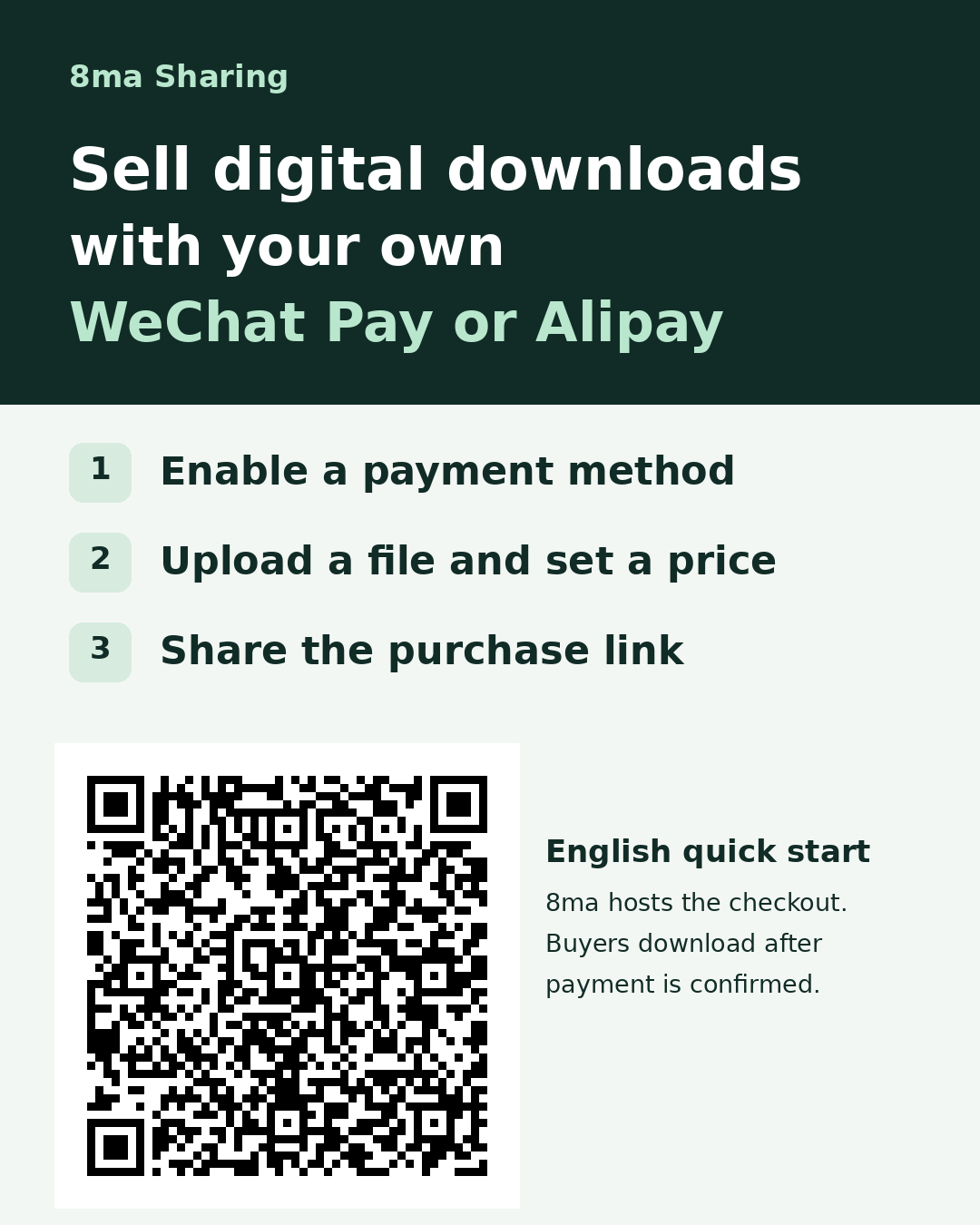
Start with the three setup steps. Choose WeChat Pay or Alipay. Already set up payments? Go to upload and pricing. Follow the PDF workbook example or browse examples for templates, courses, and license keys (in Chinese).
Published by the 8ma Sharing team.
Example: sell a workshop handout from a table sign
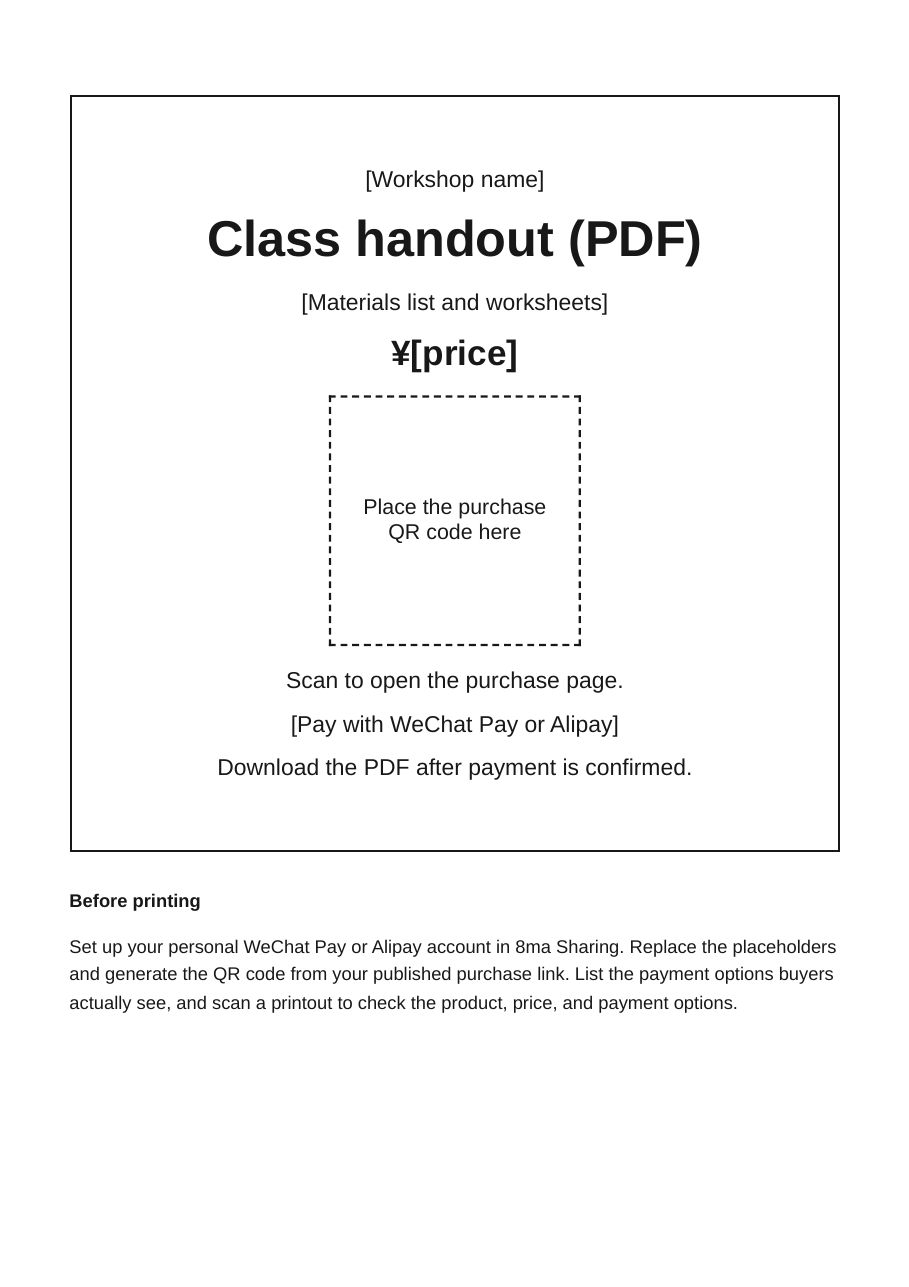
If you teach an in-person workshop, upload the PDF handout, set a price, and enable either your personal WeChat Pay or Alipay account. Put the product name and price on a sign next to a QR code made from the purchase link. You can share that same link in the class chat after the workshop. Before printing the sign, scan the code from a phone to check the price and available payment method. See the printable A4 workshop sign (Chinese).
Copy this wording for your sign
Before printing your sign, scan the QR code on a phone and confirm it opens the right handout and price. Open the link from your draft class announcement, too, and check that it leads to the same purchase page. Copy the class chat announcement. After an actual order is confirmed, use the workshop handout first-order checklist to verify the PDF download. Copy the first-order record to log both checks.
[Workshop name] handout (PDF)
Includes [materials list and worksheets] · ¥[price]
Scan to open the purchase page. Download the PDF after payment is confirmed.
[Put the QR code here]
Under the code, list the payment methods your purchase page offers: “Pay with WeChat Pay,” “Pay with Alipay,” or “Pay with either WeChat Pay or Alipay.”
A4 table sign example
Replace the workshop name, price, and sample QR area with your own details before printing.
Set up payments for your handout
Watch the 16-second payment and listing overview
Compare personal WeChat Pay and Alipay setup and choose one to start. Once it’s ready, upload your PDF and set a price.
After payment, where to download your handout
Copy this message when a learner asks where to download the PDF. If they closed the payment page, you can help a learner recover a paid order.
Open the same link you used to buy the handout. Once payment is confirmed, download the PDF from that page. If the order still shows as pending, send me your order number in a private message and I can check its status.
Have the handout ready? Register to list your workshop PDF. The registration page is in Chinese. English signup help for workshop hosts.
See the Chinese table-sign template for sample wording.
Example: sell an original guitar tab with practice audio
Put the full PDF tab, a slow practice track, and a short note about permitted uses into one ZIP. Set up either your personal WeChat Pay or Alipay account, upload the ZIP, and set a price. Share one purchase link next to a sample page and a short audio preview so players can check the notation and tempo before buying.
Check your tab and preview before sharing
Bars covered by the public preview:
Tuning and tempo match the tab:
Full PDF and practice track open after extracting the ZIP:
Purchase link opens on a signed-out phone:
Item, price, and payment options match the listing:
List the ZIP and copy its purchase link. Paste the link into the purchase note below once the listing is live. Check delivery after the first confirmed order.
Copy this purchase note for your guitar tab
Preview [sample page or audio link]. The full ZIP includes [PDF tab and practice track] for [price]. Open [purchase link] and choose a payment option shown at checkout. Save the original link, your order number, and your receipt. Once your order is confirmed, reopen the same link to download the ZIP.
Copy an order recovery message if a buyer closes checkout or switches devices. Chinese purchase template.
Play the four-bar preview. Ready to sell your PDF and practice track? Register to list your guitar tab. The registration page is in Chinese.
Check your first guitar tab delivery
After an actual order is confirmed, reopen the original purchase link as the buyer and download the ZIP. Extract it before checking the files.
Original purchase link downloads the ZIP:
Full PDF opens and matches the advertised edition:
Practice track plays at the stated tempo:
Issues and retest:
Choose a payment method for your guitar tab
Start with personal WeChat Pay if you can keep the 8ma Windows helper running. Otherwise, choose personal Alipay and scan the activation QR code with your own Alipay account. Once one method is ready, publish your ZIP and use the purchase link next to your free sample.
Watch the 16-second setup demo
Compare personal WeChat Pay and Alipay setup and choose one to start. Once it’s ready, upload your ZIP and set a price.
See the guitar tab and four-bar audio preview in our Chinese walkthrough.